Rebates and incentives
The rebates your customer qualifies for, by their ZIP code.
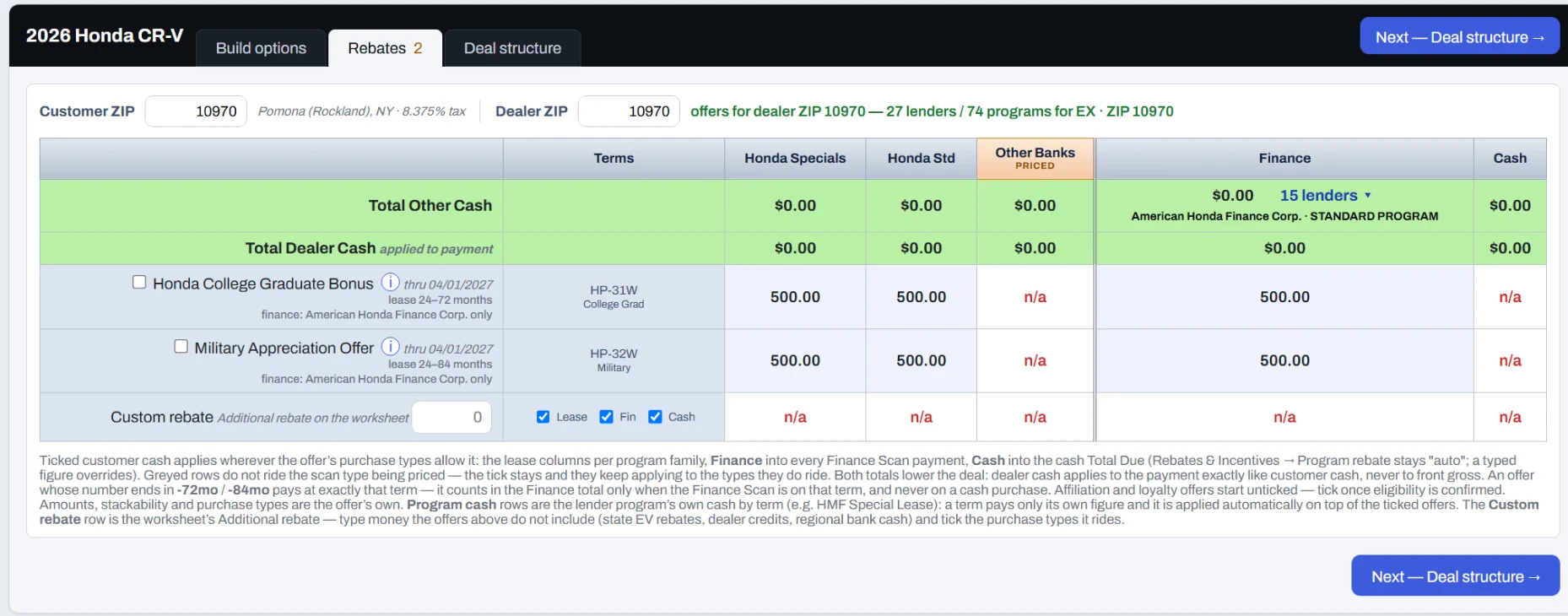
Type the customer’s ZIP and iDesking lists the manufacturer offers for the exact trim, with their dates and the lenders they apply to. Tick the ones the customer can get and every scan uses them.
No credit card requiredApproved the same business dayCancel anytime
Offers matched to the customer, not the dealership
Rebates follow the customer’s ZIP, so an out-of-area buyer gets the offers where they live. Your dealer ZIP stays separate.
- College graduate, military, loyalty and conquest offers
- End dates on every offer
- Which lender and which purchase type each offer rides on
Applied where they belong
A ticked offer only lowers the payments it is allowed to: lease cash on leases, finance cash on finance, and only at the lenders that honor it.
- Dealer cash applied to the payment automatically
- A custom rebate line for anything extra, like a state EV rebate
- Totals for each lender family side by side
Questions
Common questions
Do I still have to check eligibility?
Yes. Affiliation and loyalty offers start unticked; you tick them once the customer’s eligibility is confirmed.
Can I add a rebate that is not listed?
Yes. Use the custom rebate line and choose whether it applies to lease, finance or cash.
More answers on the FAQ page.
Keep reading